
Deep dive into KEDA.
KEDA, Kubernetes Event-driven Autoscaling.

Hello subscribers. Thank you so much for reading my second article. Today I'm going to cover a project called KEDA. I chose it because it's an interesting project that I've used very well in my work, so I hope you enjoy it!
1. Introduction to KEDA
1) What is HPA?
The Horizontal Pod Autoscaler (HPA) in Kubernetes is one of the core components responsible for the automatic scaling of applications running within a Kubernetes cluster. HPA dynamically adjusts the number of Pods based on the load of the application, helping to ensure that the application is always running at optimal performance.
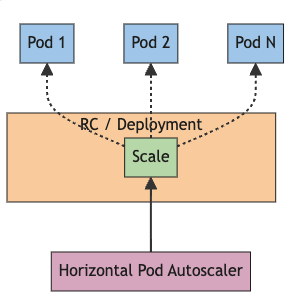
HPA works primarily based on resource metrics such as CPU usage and memory usage. You can set up HPA for a specific Deployment, ReplicaSet, or other resources, and HPA periodically collects metrics to adjust the number of Pods.
However, HPA relies heavily on resource metrics such as CPU and memory usage, which can be limiting for workloads that require event-driven scaling. To compensate for this limitation, tools like KEDA have emerged, which allow you to implement scaling policies based on a wider variety of event sources.
2) What is KEDA?
Kubernetes Event-Driven Autoscaling (KEDA) is an open source project that enables automated, event-driven scaling of containerized applications within a Kubernetes cluster.
While the traditional Kubernetes Horizontal Pod Autoscaler (HPA) scales pods based on CPU and memory usage, KEDA does things differently, leveraging a variety of event sources to support more sophisticated scaling policies. For example, you can adjust the scaling of your application based on specific events or metrics, such as the number of messages in a message queue, the number of records in a database, or the number of HTTP requests.
KEDA provides the following key features out of the box
Event-based scaling
By utilizing various event sources, you can scale your application only when needed. This helps to maximize the efficiency of resource usage and reduce costs.
Broad scaler support
KEDA supports a wide range of scalers, including Azure Event Hubs, Kafka, RabbitMQ, Prometheus, AWS SQS, and more, making it easy to integrate with multiple environments.
Flexible scaling policies
KEDA allows you to set a variety of scaling policies, including minimum and maximum pod counts, cooldown periods, and more, giving you the flexibility to adapt to your specific needs.
2. KEDA at a Glance
1) Architecture of KEDA
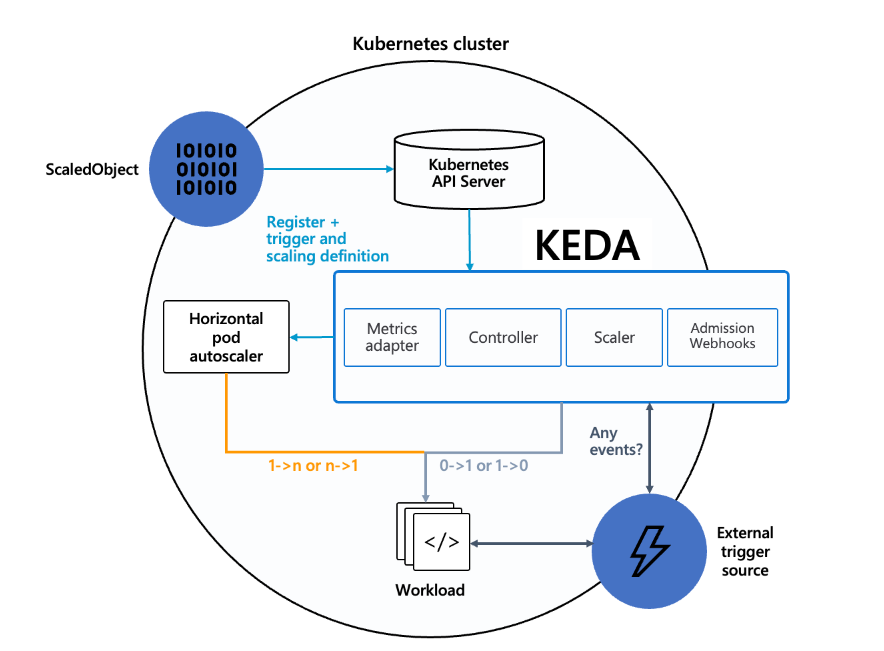
a. ScaledObject
Role
ScaledObject is a custom resource that defines the scaling policy in KEDA. This includes information such as which event sources to use, which metrics to monitor, setting the minimum and maximum number of pods, etc.
Functionality
ScaledObjects allow users to set specific scaling requirements for a particular application. The ScaledObject is processed by the KEDA Operator, and scaling operations are performed based on it.
b. Controller
Role
Controller is the core operations manager of KEDA, responsible for monitoring and managing ScaledObject and TriggerAuthentication resources within a Kubernetes cluster.
Functionality
The Controller detects creation, update, and deletion events of resources and executes the scaling policies defined for those resources. This allows the Pod to dynamically scale up or down to meet the needs of the application.
c. Scaler
Role
Scaler is responsible for interfacing with specific event sources to detect the occurrence of events and scale up or down Pods based on them.
Functionality
Each Scaler collects and analyzes metric data from its event source, and adjusts the number of Pods as needed. A variety of Scalers are available, and you can choose the event source that fits your needs.
d. Metrics Adapter
Role
Metrics Adapter is responsible for integrating metrics data from KEDA with Kubernetes' native metrics system.
Functionality
Metrics Adapter provides the collected metrics data to the Horizontal Pod Autoscaler (HPA), allowing the HPA to automatically scale Pods up or down based on real-time metrics.
e. Admission Webhooks
Role
Admission Webhooks are responsible for validating KEDA resources and modifying them if necessary.
Functionality
Admission Webhooks detect when ScaledObject and TriggerAuthentication resources are created or changed, and validate the resources according to set policies. This ensures that KEDA resources are configured correctly within the cluster.
2) ScaledObjects and ScaledJob
KEDA provides two main resources to support different scaling scenarios: ScaledObject and ScaledJob. Each is designed for a specific use case, with the following differences.
a. ScaledObject
ScaledObjects are primarily used to scale continuously running applications (e.g., deployments, statefulsets, etc.). ScaledObjects dynamically adjust the number of Pods by monitoring certain metrics.
Purpose
Automatic scaling of continuously running applications.
Applies to
Deployments, StatefulSets, CronJobs, and more.
How it works
ScaledObject monitors a specified metric (e.g. CPU utilization, number of messages in a message queue, etc.) and adjusts the number of Pods based on a set threshold.
Example use case
web servers, database servers, message queue consumers, etc.
b. ScaledJob
ScaledJob is used to handle one-time jobs. A ScaledJob creates a one-time job when certain conditions are met, and releases the resources when the job is finished. This is useful for batch jobs or batch processing jobs.
Purpose
Automatic scaling of one-time jobs or batch jobs.
Applies to
Job resources.
How it works
ScaledJob monitors a specified metric or event source (for example, the number of messages in a queue) and, when the condition is met, creates a new job to process the work. When the job is complete, it automatically releases resources.
Example use cases
Data processing jobs, log analysis, image processing, etc.
3. Operating KEDA
1) Install KEDA
You can find more detail on the link.
helm repo add kedacore https://kedacore.github.io/charts
helm repo update
helm install keda kedacore/keda
2) Deploy ScaledObject
# my-scaledobject.yaml

apiVersion: keda.sh/v1alpha1
kind: ScaledObject
metadata:
  name: my-scaledobject
  namespace: default
spec:
  scaleTargetRef:
    apiVersion: apps/v1
    kind: Deployment
    name: my-deployment
  minReplicaCount: 1
  maxReplicaCount: 10
  triggers:
- type: cpu
  metadata:
  type: Utilization
  value: "50"
kubectl apply -f my-scaledobject.yaml4. Integrating KEDA with other tools
1) Integration with Prometheus
KEDA can integrate with Prometheus to implement autoscaling based on metrics in your application. Prometheus is an open source monitoring system that is used to collect and visualize various metrics. By leveraging metrics from Prometheus, KEDA can scale up or down pods in your application when certain metrics (such as CPU usage, memory usage, user-defined metrics, etc. This helps you optimize the performance of your system and manage resources efficiently. For example, if your web application experiences a spike in the number of requests, KEDA will automatically increase the number of pods based on Prometheus metrics to handle the traffic.
2) Integration with Kafka
KEDA can implement message-based autoscaling through integration with Apache Kafka. Kafka is a distributed streaming platform, widely used to process large amounts of real-time data. KEDA monitors the number of messages in Kafka topics and automatically scales up or down the pods of your consumer applications when the number of messages accumulated in a particular topic exceeds a threshold. This increases the efficiency of real-time data processing and minimizes message latency. For example, for applications that process log data, when a Kafka topic experiences a spike in log messages, KEDA automatically increases the number of pods to ensure that logs can be processed quickly.
3) Integration with Azure Functions
KEDA integrates with Azure Functions to enable event-driven autoscaling even in serverless computing environments. Azure Functions is a serverless computing service that executes code in response to events, reacting to a variety of event sources (e.g., HTTP requests, database changes, timers, etc.). KEDA can monitor triggers in Azure Functions and automatically scale up or down instances of a function when certain conditions are met. This can help you optimize the performance of your serverless applications and reduce costs. For example, if your image processing function needs to respond to a large number of image upload events, KEDA can automatically scale up instances of the function to process images quickly.